Buying PlayStation 1 games online can feel like a minefield. You’re relying entirely on seller photos to assess condition, and if you don’t know what to look for, you might end up with a nasty surprise when you new game arrives. This guide will walk you through exactly what to check when evaluating PAL PS1 games from online listings. I’m only covering the standard releases here - I will cover cardboard cases separately later on (and update here when I do).
And yes, I know genx/millennials love their printables, so I’ve created a printable checklist you can print and tick off like it’s 1997.
The Case Itself
Let’s start with the jewel case. These plastic cases have survived decades and often show their age.
What to check:
- Front, back, and sides - Look for cracks, particularly at the corners and ends. These are the most vulnerable areas and crack damage is common.
- PlayStation logo position - The PlayStation logo should be at the bottom and offset to the right to allow space for the hologram. The P in PlayStation should not be obscured by the hologram.
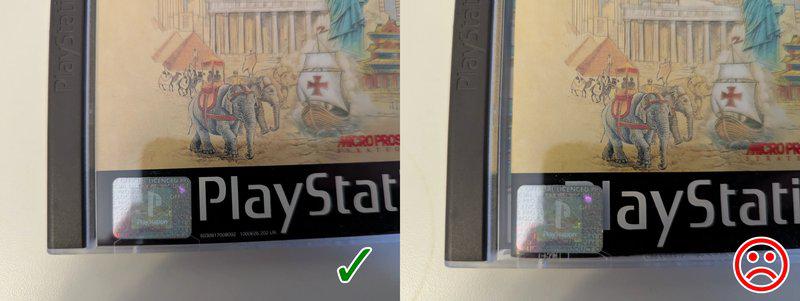
The Epidemic Exception: The PAL release of Epidemic has an incorrectly centered PlayStation logo (the positioning typically used on manuals). This unusual placement doesn’t leave proper space for the hologram, which was then awkwardly affixed above the logo area instead of in its standard position.
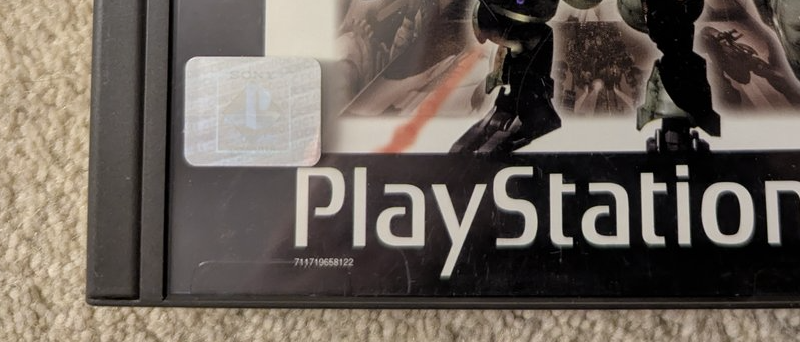
Spine considerations - Check for warping, damage, or if it’s missing entirely. Sadly, sellers rarely photograph the spine in online listings. If there are no spine photos, it’s a calculated risk. On platforms like eBay, significant undisclosed damage might be covered by buyer protection guarantees. However, minor spine warping typically wouldn’t qualify. Low risk overall, but worth being aware of.
The Hologram
This is crucial for authenticating black label PAL releases.
Standard placement: Holograms are located in the bottom left corner of the front case.
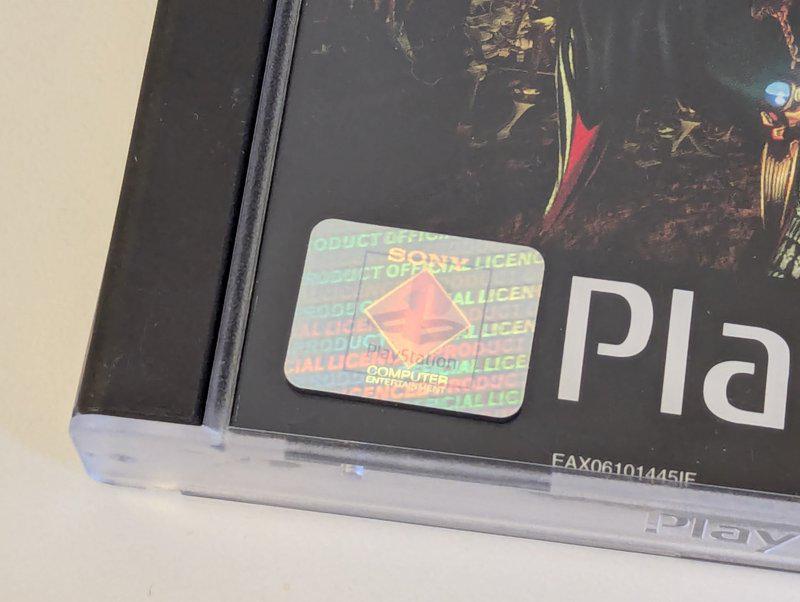
General rule: All PAL black label games should have a hologram. Platinum releases also have holograms.
Notable exceptions: Three games have holograms but lack the standard black band with the PlayStation logo across the bottom:
- French Dragon Ball Z
- Ridge Racer Revolution
- Namco Museum Vol 3, 4 and 5
These are legitimate releases, just manufactured differently. Don’t let the missing black band alarm you if you’re buying these specific titles.
Do check out my article about fake holograms here
Contents Check
Before you even think about the disc condition, verify what should actually be in the box.
Minimum contents for a complete PAL PS1 game:
- Disc
- Case
- Front artwork inlay
- Rear artwork inlay
- Manual
Additional materials: Some games include extra items like fold-out maps, strategy guides, or registration cards. Check the game listing on this site for a detailed overview of the contents for specific releases.
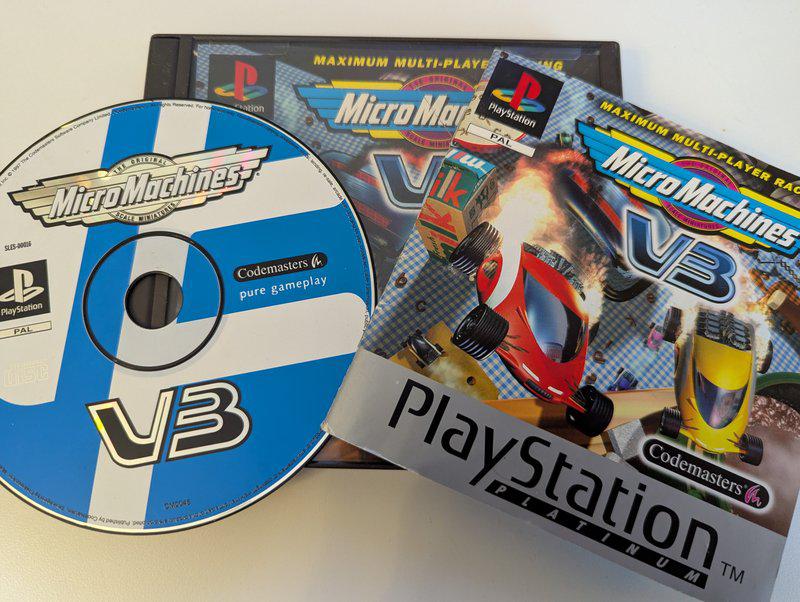
Mixed Platinum and black label components: This is more common than you’d think. Sellers sometimes mix components from different versions, either intentionally or through careless storage. For example, a black label disc with a Platinum manual, or vice versa.
You need to spot these mixtures and decide if you’re comfortable with it. Mixed components would reduce the price and value of the item. For purist collectors, this is a dealbreaker. For players who just want the game, it might not matter.
CD Spindle Condition
This often-overlooked detail can affect how well your disc is held in place.
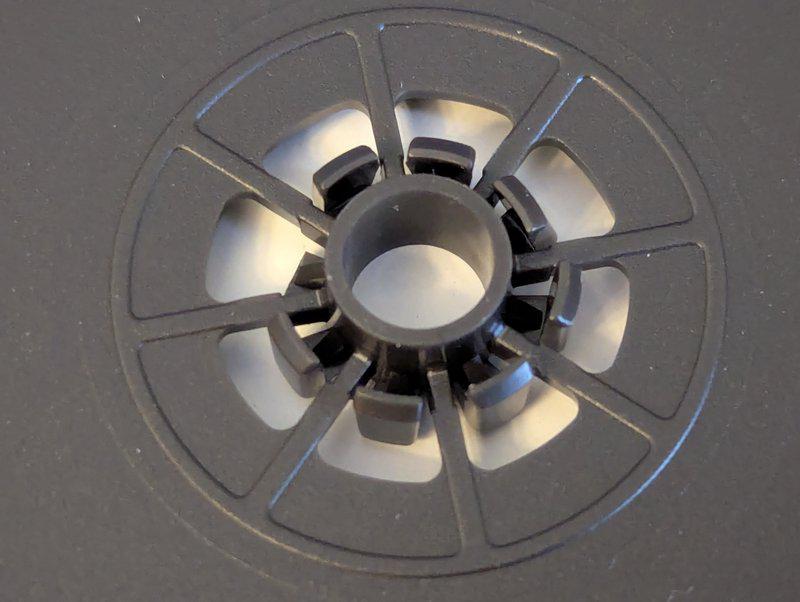
Check that all the spindle teeth are present and look intact. Missing or broken teeth mean the disc won’t clip in properly, which increases the risk of it rattling around and getting scratched during transport or storage.
One to look out for are the small black bordered cases - these teeth are most fragile and harder to replace.
The Disc
PS1 discs are remarkably hardy, but they’re not indestructible.
Surface scratches: PlayStation 1 discs can handle quite a bit of surface damage before playback is affected. Don’t panic over light scratching - these discs need significant surface damage to cause problems.
The mystery failures: Worth noting that some discs simply don’t work despite having no visible damage whatsoever. Manufacturing defects or internal deterioration can cause this. There’s no way to spot this from photos, unfortunately.
What to actually worry about:
- Center damage - Cracks or damage around the center hole are bad news - avoid games with any issues visible here.
- Label damage - Peeling, flaking, or missing label sections - the data layer sits just beneth the label.
- Disc rot - Look for strange random like patterns of damage on the data layer. You’ll likely only see this on games without a full label so you can see the silver data layer. It is very difficult to see this on the black side.
Manual Inspection
Manuals take a beating over the years. Here’s what degrades them:
Writing and graffiti - Check for pen marks, names, doodles, or game notes scrawled throughout. Previous owners loved documenting their save files and cheat codes directly in manuals - usually towards the back where you would find blank “notes” pages.
Foxing - Those brown age spots that appear on paper over time. Common in older manuals and not really preventable. Mild foxing is cosmetic, but severe foxing can make pages brittle.
Loose pages - Staples or glue fail. Check if pages are coming loose or if the manual is falling apart at the spine. Usually visible on closed manuals as the pages no longer properly fit in.
Front Inlay Artwork
The front inlay is the main artwork for a game. It takes specific types of damage:
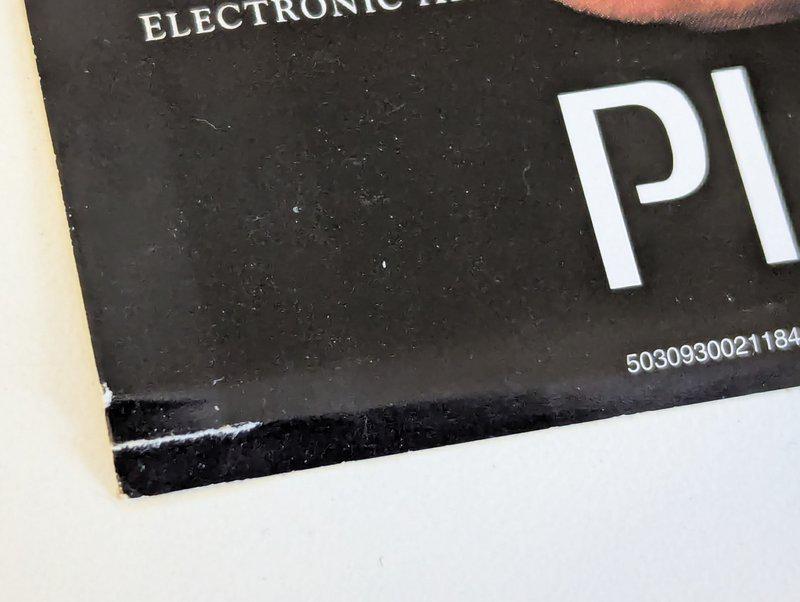
Tears along case teeth - The clear case has small plastic teeth that hold the inlay in place. These teeth commonly tear the paper along the top or bottom edge. Look carefully at the artwork in photos for these common issues.
Folds and creases - Any crease is unfortunate, but metallic or foil artwork shows creasing especially badly. Games with shiny, reflective covers will show every fold and wrinkle prominently like Colin McCrae Rally 2.0.
Writing - Just like manuals, people wrote on inlays. Price stickers, names, rental information - check for all of it. You’ll only see this on the back when the case is opened.
Stickers and Markings
Ah, the bane of collectors everywhere.
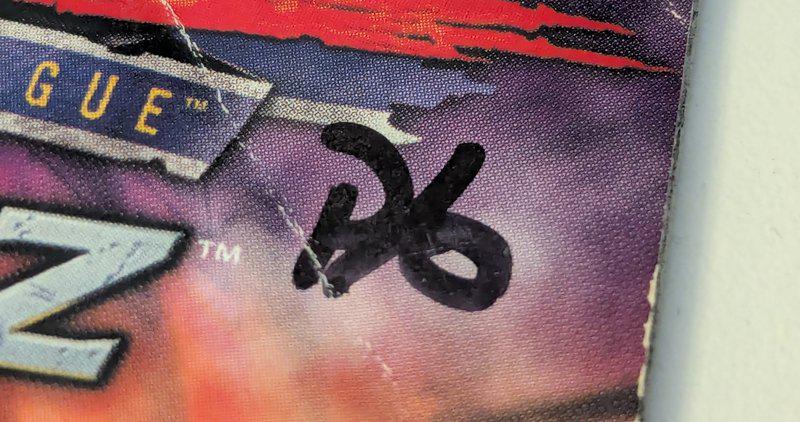
The preowned plague: UK retailers love slapping preowned price stickers all over cases. The classic “P” pen marking appears everywhere - on cases, on artwork, sometimes on discs. It’s annoying and disappointing when you’re trying to build a clean collection.
The critical distinction: Are stickers on the plastic case or directly on the artwork? Sometimes hard to tell - try to see if there is a shadow on the artwork suggesting there is a space between the sticker and paper.
- Stickers on plastic: Annoying but removable with patience and the right techniques
- Stickers on artwork: Potentially permanent damage. Removing them risks tearing the paper or leaving residue and marking
Always check sticker placement in photos. If you can’t tell, maybe ask the seller before purchasing.
For what it’s worth - stickers on artwork are not worth removing yourself as there is a high risk you would permanently damage the paper.
Best to leave these be and keep an eye out for a suitable replacement.
One final thing to worry about though - is there being a previous, failed attempt to remove a sticker, so that it now covers permanent damage to the artwork.
Making Your Purchase Decision
You’ve got your checklist and you know what to look for. Now it’s about balancing condition against price and your collecting goals.
Are you a completionist who needs pristine black label originals? Or a player who just wants working games? Your tolerance for condition issues should match your intentions and what you’re paying.
Remember, this guide focuses on what you can assess from online photos. Some issues only reveal themselves when the game arrives, but following this checklist dramatically reduces the chance of disappointment.
Now get out there and happy hunting. May your cases be crack-free and your holograms authentic.