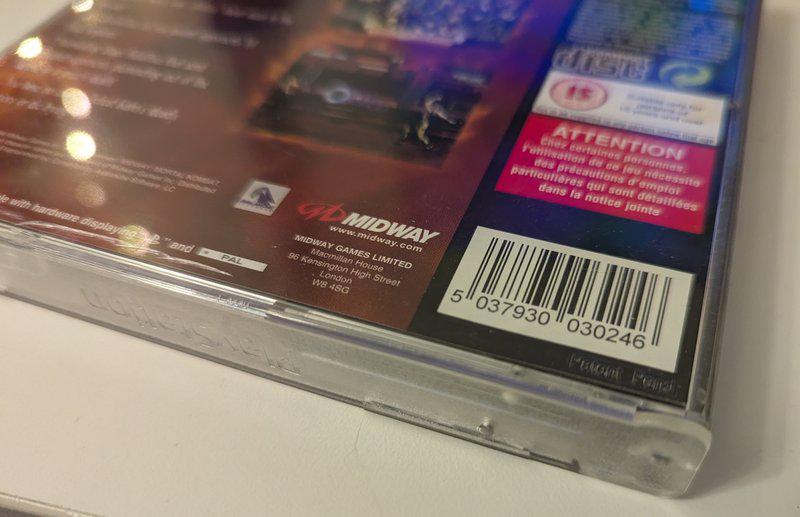
The Problem: Too Many Games, Not Enough Time
When you’re buying and selling PlayStation games on eBay it can be helpful to quickly find out if we have a specific game release in our system. Is this release already in the database? Which images do we have? These questions used to mean opening a browser, searching the spreadsheet, cross-referencing the asset manifest… all whilst a game sat on your desk waiting to be photographed and listed.
I needed something faster. Something that could tell me in seconds whether a game was worth documenting or if we already had complete coverage.
The Solution: PALPSXDB Barcode Scanner
The result is a Python tool that uses your webcam to scan the EAN-13 barcode on any PAL PS1 game, instantly checks it against the PALPSXDB database, and displays which images we have on file.
Point your webcam at a barcode. Get immediate feedback on:
- Whether the variant exists in the database
- Complete game details (title, code, publisher, developer, release type)
- Exactly which images we have (front, back, disks, manuals, barcode)
- Whether documentation is complete or still missing assets
How It Works
The scanner leverages several technologies to make lookups instantaneous:
Webcam Integration: Uses OpenCV to capture video from your webcam with digital zoom to help frame barcodes properly.
Robust Barcode Detection: Employs pyzbar with nine different image processing strategies to decode even difficult barcodes:
- Standard greyscale detection
- High-resolution upscaling for small barcodes
- Contrast and brightness adjustment
- Gaussian blur for noisy images
- Adaptive thresholding for varying lighting
- Morphological operations to clean up damaged barcodes
- Edge detection for worn cases
- Multi-angle rotation for misaligned reads
Database Lookups: Queries the SQLite PALPSXDB database directly, joining across multiple tables to pull publisher names, developer info, hologram types, and case variants in a single query.
Asset Manifest Checking: Cross-references the assets_manifest.json to count available images in each required category (front, back, disks, manuals, barcode) and flags incomplete documentation.
Real-World Usage
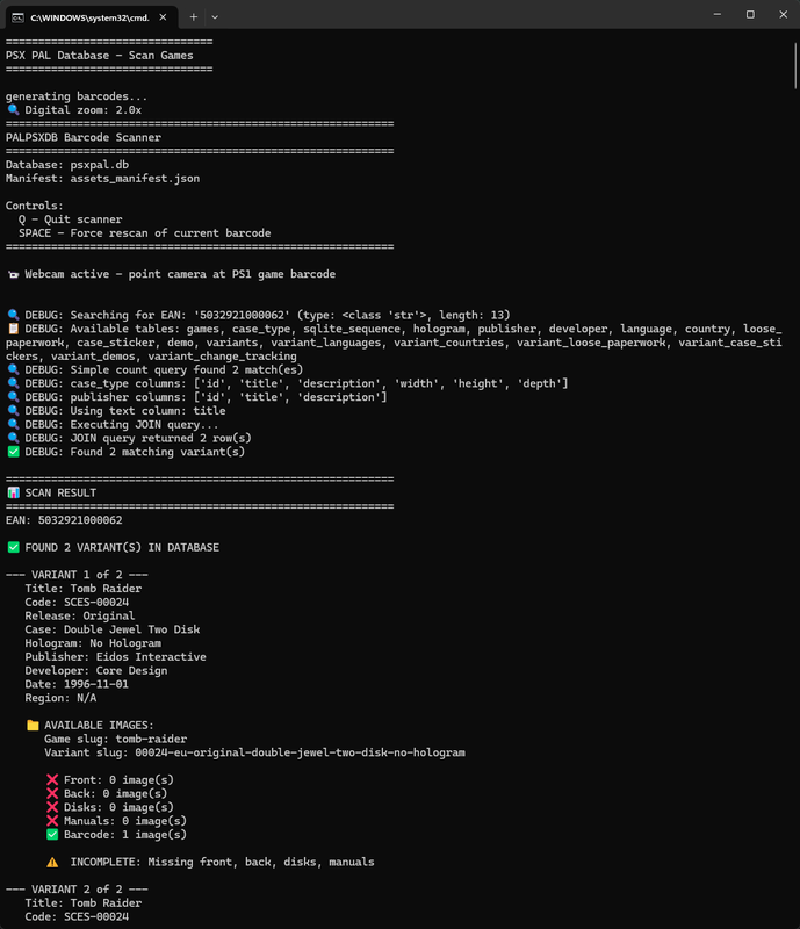
The scanner runs in a continuous loop. Hold a game up to your webcam, and within a second or two, your terminal fills with information:
📊 SCAN RESULT
================================================================
EAN: 5032921000062

✅ FOUND 2 VARIANT(S) IN DATABASE

--- VARIANT 1 of 2 ---
Title: Tomb Raider
Code: SCES-00024
Release: Original
Case: Double Jewel Two Disk
Hologram: No Hologram
Publisher: Eidos Interactive
Developer: Core Design
Date: 1996-11-01
Region: N/A

📁 AVAILABLE IMAGES:
   Game slug: tomb-raider
   Variant slug: 00024-eu-original-double-jewel-two-disk-no-hologram

   ✅ Barcode: 1 image(s)
   ❌ Front: 0 image(s)
   ❌ Back: 0 image(s)
   ❌ Disks: 0 image(s)
   ❌ Manuals: 0 image(s)

   ⚠️  INCOMPLETE: Missing front, back, disks, manuals
Instantly, I know this variant exists in the database but we’re missing four critical image sets. That means this copy is worth documenting before it goes back on eBay.
Scan another game:
📊 SCAN RESULT
================================================================
EAN: 5015839286964

✅ FOUND 1 VARIANT(S) IN DATABASE

Title: Theme Park
Code: SCES-00072
Release: Original
Case: Full Jewel PAL
Hologram: No Hologram
Publisher: Electronic Arts
Developer: Bullfrog Productions
Date: 1995-10-15
Region: N/A

📁 AVAILABLE IMAGES:
   ✅ Front: 1 image(s)
   ✅ Back: 1 image(s)
   ✅ Disks: 1 image(s)
   ✅ Manuals: 2 image(s)
   ✅ Barcode: 1 image(s)

   ✨ COMPLETE: All required images present!
This variant is fully documented. No need to photograph it—straight to the listing.
The Impact on Workflow
Before the scanner, checking a game meant:
- Opening a browser
- Navigating to the database
- Searching for the SCES code or title
- Cross-referencing the asset manifest file
- Manually counting which images existed
This took 2-3 minutes per game. With 20+ games passing through weekly, that’s nearly an hour of administrative overhead.
Now the entire process takes 5 seconds. Point. Scan. Decision made.
For a single-person operation documenting the PAL region systematically, this kind of efficiency matters. It means more time photographing variants that genuinely need coverage and less time handling games we’ve already archived.
The Code
The scanner is written in Python and relies on a few key libraries:
- OpenCV (
cv2) for webcam capture and image processing - pyzbar for barcode decoding
- sqlite3 for database queries
- Standard libraries for JSON parsing and file handling
The tool is designed to work with the existing PALPSXDB structure—no modifications to the database schema required. It reads directly from psxpal.db (this is the sql database we import/convert our main data into for processing) and assets_manifest.json (this is a generated file from the image library we have), making it plug-and-play for anyone with access to the archive.
Future Enhancements
There’s room to expand this further:
- Image upload integration: Automatically tag scanned images with the correct variant slug
- Missing image prioritization: Generate a “most needed” list based on incomplete variants
For now, though, it does exactly what it needs to: turn a 3-minute process into a 5-second one.
The PALPSXDB Barcode Scanner is part of the ongoing effort to document every PAL PlayStation variant with high-quality images and accurate metadata. If you’re working with PAL games and want to contribute to the database, reach out—we’re always looking for more eyes on the collection.